



Connecting to OCI FastConnect from your datacenter or corporate office should follow the same evaluation rigor you performed when you decided Oracle would be your cloud vendor. Even if you are not a WAN or Telco expert, we will discuss the basics so you can uplevel your routing and switching knowledge and vendor approach to solve this network topology requirement. OCI FastConnect is a superior on-ramp network environment into Oracle Cloud Infrastructure, where they have removed a lot of guesswork. We have designed and implemented hundreds of OCI FastConnect environments for Oracle clients globally and we will explain various steps we take in this process. Even if you have an existing WAN such as MPLS, Private Lines or SDWAN, depending on the provider, a FastConnect node might be all that’s required to establish routes from on-premise to FastConnect. FastConnect is similar in concept to other CSPs that deliver an on-ramp to their cloud; it is essentially the on/off ramp to their cloud highway. It is very important you understand the differences between providers who can complete a FastConnect connection to your on-premise datacenter. Each location serves as its own use case, and not all providers can support all FastConnect regions. This is not an OCI limitation, but a telecom provider limitation based on network reach, latency or route refelector buildout. The providers we work with include Tier-1 ISPs, Tier-2/Tier-3 ISPs, Colocation Data Center Providers and other niche playerto other niche providers, as not all use cases serve FastConnect the same.
Download our Fee EBook below on OCI FastConnect pricing ranges from various provider options. 

Here at Macronet Services, we have designed over 300 FastConnect options for clients Globally ranging from Multi-Cloud or Hybrid Cloud DataCenters or from Corporate Offices. Our partnership with Oracle offers clients a free design and setup from OCI FastConnect to your on-prem datacenter or offices. Plus, we have over 20+ years of designing Global Tier-1 ISP connections for public and private networks, affording you a deep experience team with active technical/pricing trends.
OCI FastConnect Steps clients to design options into to FastConnect from on-premise.
-
Step #1: Identify the amount of Data transferring between OCI Regions to your Corporate Data Center
- To size the FastConnect circuit, we calculate the Bandwidth size against the average throughput time required to complete the route from origination to destination. For example, do you require 100 TBs from your colocation Data Center to be routed to OCI, and if so, by what time should this job complete? Each application and database workload for organizations has equally different requirements. It is important not to over- or undersize the bandwidth connection. The wrong size can impact your cost from the provider, both in monthly service fees and commercial commitment length. When we design a FastConnect network, we will identify all variables to complete a thorough assessment.
-
Step #2: Design a Topology & Connection Method
- Designing the network after identifying regions, latency, bandwidth capacity etc., is a critical step for success. Typically, we’ll look for the Fastest, lowest-latent, most affordable provider. This is important as in some areas of the world one provider fits better compared to another region. Why? Cost Factors, network backbone, support all play into the ecoystem and it is very difficult for enterprises at times to sift through these vendors. Most enterprises are not designing global networks and ones which require a FastConnect spur in the design. Macronet Services is assisting clients worldwide, so our deep set of cadences and cycles provides an excellent baseline for those just starting the journey.
- Another option is we’ll look at any existing service providers you work with today, as they may have an easy option to connect into OCI FastConnect. If this is both a feasible technical and cost option, we have helped many enterprises leverage their existing relationships.
-
Step #3: Connection Options
- Identifying which type of connection to be used within FastConnect is critical, and there are varying steps for each option. Carriers are designed to offer either a direct connection with a physical circuit or to be pre-configured as a partner connection. Following the previous steps, you will be able to determine which options best support your WAN. When we design this stage with the enterprise client, we take into all prior considerations, including cloud mobility (will you move to another region in the future) does your network have flexibility to be charged more like a utlitity etc. The core component connection options in OCI FastConnect are:
-
-
- Direct Connection (via Oracle): This is where a physical circuit, often fiber, is connected directly into OCI FastConnect
- Connect directly to an OCI FastConnect Availability Domain
- Requires your own Layer 3 routing equipment, which sits on-prem
- We identify your Bandwidth Speed, Maximum latency, budget, and contract term needed from a telecom partner.
- Drawbacks of a Direct Connection is it’s a physical installation, which does have a lead-time. We can pull up our Fiber Tool and show you which carriers are available to your on-prem location and to Oracle Cloud
- Direct Connection (via Oracle): This is where a physical circuit, often fiber, is connected directly into OCI FastConnect
-
-
-
- Partner Connection:
- Use a FastConnect Partner’s network to establish a BGP peer to OCI FastConnect.
- Establish an OCID in the Tenant
- Set up the BGP Peering and Oracle private ASN into the partner network.
- Macronet Services’ support partner team can walk you through the steps as the installation on the OCI region completes in minutes.
- The Drawback is that there will be a physical connection on-premise; however, the OCI region is usually pre-wired.
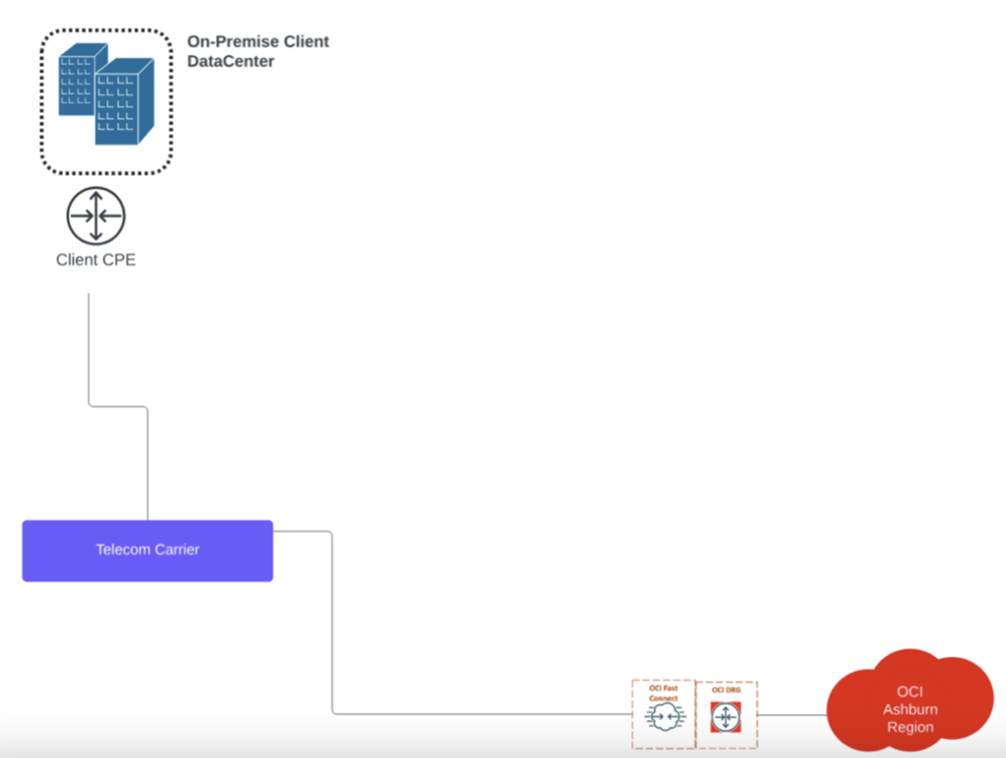
- Partner Connection:
-

Technical Requirements of OCI FastConnect:
-
- Support for BGP (Border Gateway Protocol)
- 1Gbps or 10Gbps port speed
- 802.1Q VLAN tagging capability (vendor dependent)
- Support for dynamic routing
- ASN (Autonomous System Number)
- High-level Basic Setup Steps:
- Create a Virtual Circuit in OCI Console
- Configure your router for BGP
- Set up VLAN tagging
- Establish BGP peering
- Configure routing policies
- Important Considerations: (We covered some of this earlier, however we’ll assist you)
- Redundancy. If budget exists, we always advise on a N+1/HA design enabling at least two paths on diverse equipment to route from OCI FastConnect.
- Bandwidth requirements
- Geographic proximity to FastConnect locations
- Cost comparison between different providers
What would be an example of an OCI Console configuration for FastConnect? In general, we’ve included some of the OCI Console and Router Configuration steps. Your environment may differ and enhancement toOCI occur regularly so it is best to contact us for the latest and understand your on-premise setup.
- Login into your OCI Tenant
- Navigate to Networking → FastConnect
- Click Create FastConnect
- Choose connection type:
- FastConnect Partner
- Port Based
- Fill required details:
- Compartment
- Virtual circuit name
- Provider (if using partner)
- Bandwidth
- Customer BGP ASN
- Dynamic routing gateway (DRG)
- Choose connection type:
- Your on-premise Router Configuration Steps for OCI FastConnect:
# Basic & start of a Cisco IOS configuration example
! Configure VLAN interface
interface GigabitEthernet0/0.100
encapsulation dot1q 100
ip address 192.168.1.2 255.255.255.252
no shutdown
! BGP Configuration
router bgp <your-asn>
neighbor 192.168.1.1 remote-as <oracle-asn>
neighbor 192.168.1.1 description OCI-FastConnect
neighbor 192.168.1.1 password <md5-password>
! Network advertisements
network 10.0.0.0 mask 255.255.0.0
! Optional: BGP timers
neighbor 192.168.1.1 timers 10 30
- Virtual Circuit Status Verification:
# On Cisco Router
show ip bgp summary
show ip bgp neighbors
show ip route bgp
# In OCI Console:
– Check Virtual Circuit status
– Verify BGP session status
– Monitor route advertisements
- Test and Validation:
- Ping Oracle services
- Test connectivity to VCN resources
- Verify route propagation
- Check bandwidth utilization
- Test failover if redundant setup
- Common Issues and Solutions:
- BGP not establishing:
- Check ASN numbers
- Verify MD5 authentication
- Confirm IP addressing
- Routes not propagating:
- Check route advertisement configuration
- Verify route security lists
- Confirm DRG route tables
- BGP not establishing:
- Security Considerations:
- Implement route filters
- Set up prefix lists
- Configure maximum prefix limits
# Example BGP security configuration
router bgp <your-asn>
neighbor 192.168.1.1 maximum-prefix 100
neighbor 192.168.1.1 prefix-list ALLOWED_PREFIXES in
neighbor 192.168.1.1 prefix-list ADVERTISE_PREFIXES out
- Monitoring Setup:
- Configure SNMP monitoring
- Set up BGP session alerts
- Monitor bandwidth utilization
- Track route stability
A basic and starting point for Juniper Configuration Example for On-Premise to OCI FastConnect:
junos
# Interface Configuration
set interfaces xe-0/0/0 unit 100 vlan-id 100
set interfaces xe-0/0/0 unit 100 family inet address 192.168.1.2/30
# BGP Configuration
set protocols bgp group OCI-FASTCONNECT type external
set protocols bgp group OCI-FASTCONNECT peer-as <oracle-asn>
set protocols bgp group OCI-FASTCONNECT neighbor 192.168.1.1
set protocols bgp group OCI-FASTCONNECT authentication-key “<md5-password>”
# Route Advertising
set protocols bgp group OCI-FASTCONNECT export EXPORT-POLICY
set policy-options policy-statement EXPORT-POLICY term 1 from protocol direct
set policy-options policy-statement EXPORT-POLICY term 1 then accept
# Security
set protocols bgp group OCI-FASTCONNECT maximum-prefixes 100
- Arista Configuration Example:
! Interface Configuration
interface Ethernet1
description OCI-FastConnect
no switchport
ip address 192.168.1.2/30
! BGP Configuration
router bgp <your-asn>
neighbor 192.168.1.1 remote-as <oracle-asn>
neighbor 192.168.1.1 password <md5-password>
! Route advertisement
network 10.0.0.0/16
! Optional BFD for faster failover
neighbor 192.168.1.1 bfd
- Detailed Monitoring Commands:
OCI FastConnect to On-Premise Data Center Colocation or Wide Area Network (WAN) FAQS
What bandwidth connection speeds does OCI FastConnect support?
OCI FastConnect supports several bandwidth connection options:
-
1 Gbps
-
10 Gbps
-
100 Gbps (only available via limited carriers in some markets)
-
Sub-rate virtual circuits below 1Gbps. The FastConnect port ordered by OCI will still be 1Gbps and the handoff should support the same.
Which Telecom Carrier works with OCI FastConnect?
Each OCI Region supports a limited set of carriers, which may/may not be the same across other geographies. It’s best to contact Macronet Services, who can look up the region location in our fiber tools and .kmz’s to make the best recommendation. This will save tremendous time.
Part of Macronet Services’ commitment to perfecting the client experience when you partner with OCI, we do offer free WAN evaluation and benchmarking. Many OCI clients have benefited from our expertise to find cost optimization within their corporate network, resulting in millions in savings that can be applied to their Oracle Compute costs.
Does OCI FastConnect require BGP?
Yes. Border Gateway Protocol (BGP) is required for FastConnect to exchange routes between:
-
Your on-prem network
-
The OCI virtual cloud network (VCN)
BGP enables automatic route updates and failover.
How much does OCI FastConnect cost?
Costs typically include:
-
Port charges (Oracle side)
-
Partner connectivity fees
-
Cross-connect fees in colocation facilities
-
Data transfer charges
Does OCI FastConnect require BGP?
Yes, BGP is required typically for FastConnect to exchange routes between your on-premise network and the OCI VCN routing from FastConnect. However, this is not a traditional multi-home BGP setup with a /24, you might be familiar with working with ISPs. The peering setup is much more stripped down and easier. We can provide you with context over a Video call.
How long does it take to deploy FastConnect?
FastConnect can be deployed in minutes within the OCI Console. Connecting to another location, such as a redundant mult-cloud environment globally from your FastConnect region, can be installed with BGP propagating in 30 minutes. If you are installing a dedicated physical circuit from your on-prem data center, the timeline varies from a 1 to 45 days for a 1G circuit and 30-90 days for a 10G-100G circuit due to the size and equipment needed. 99% of the time the duration in days is due to your on-prem location, not OCI. Carriers are usually well-equipped to service the OCI region; your datacenter may not have a 100G capable connection to use immediately. This is why our free fiber analysis removes the guesswork for clients, and we’ve reduced install times by half in some instances.
Is FastConnect Secure
Yes. Security benefits include:
-
Traffic never traverses the public internet
-
Integration with OCI security policies
-
Support for private addressing
Can FastConnect connect and route to multiple OCI Regions and other cloud providers such as AWS, Azure, GCP, IBM, etc.?
Yes, this is a major benefit of FastConnect. The main items to consider are bandwidth, latency, and cost from the providers that can reach these regions. It’s recommended to contact Macronet Services so that a valid latency figure in ms can be calculated across ICMP tools before ordering. For example, Macronet Services has designed AWS East to OCI Ashburn within a few milliseconds, a requirement for many clients.
OCI FastConnect vs. VPN: Which is the better method?
OCI FastConnect is recommended vs. an IPSec VPN. IPSec requires an internet connection, which can have upstream AS issues (BGP outages and more), which as a client, you have zero control over. Additionally, you lose aproximately 20% overhead on your circuit due to encryption, so a 1G circuit is now an 800M connection. Lastly, other non-OCI clouds, such as AWS, charge a higher egress cost over an IPSec VPN vs. a private connection destined to FastConnect. If you have large volumes of data, this can add up.
Does OCI FastConnect support AI workload connectivity?
Yes. As more companies look to expand their GPUaaS with Oracle, other Clouds or even internal colocation data center space, FastConnect has been designed to support Large Language Models, RAG, and many other use cases in the AI Era.