

Data Center Migration Guide: Moving Enterprise Infrastructure to Colocation
A practical enterprise guide to planning, sequencing, executing and de-risking a migration from private or legacy data center infrastructure into colocation.
Moving enterprise infrastructure from one data center to another is easy to underestimate. At first glance, a migration can look like a facilities project: shut down the servers, disconnect the cables, move the equipment, reinstall it in a new colocation facility and power everything back on. For a small, isolated environment, the process may actually be close to that simple. For a modern enterprise, it rarely is.
A production data center can sit underneath customer applications, databases, storage systems, identity services, corporate networks, Internet connectivity, cloud platforms, cybersecurity tools, backup systems, monitoring infrastructure and external partner integrations. Some of those relationships may be well documented. Others may have developed quietly over years as applications changed, companies merged, new network services were added and temporary workarounds became permanent architecture.
That is why the central challenge in a data center migration is not physically moving equipment. It is moving the business services and technical dependencies attached to that equipment without losing control of availability, security, data integrity or performance.
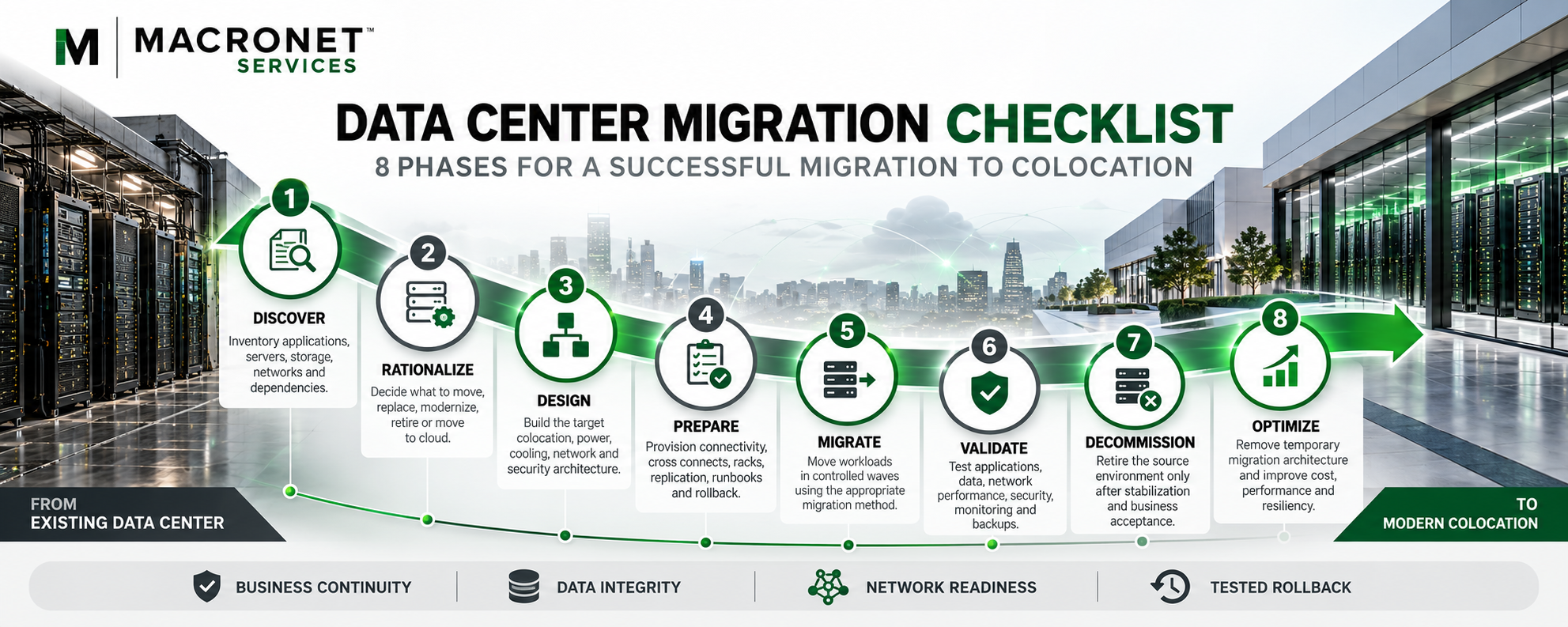
A useful way to think about the migration lifecycle is Discover → Rationalize → Design → Prepare → Migrate → Validate → Decommission → Optimize. Each phase addresses a different category of risk. Discovery establishes what really exists and how it is connected. Rationalization determines what should actually move. Design creates the target environment. Preparation ensures that the destination, connectivity and operating processes are ready before production systems are disrupted. Migration moves workloads in controlled stages. Validation confirms that applications and business processes—not merely servers—work correctly in the new environment. Decommissioning safely retires what is no longer needed, and optimization uses the migration as an opportunity to improve the architecture rather than simply reproduce it.
The best data center migration is therefore not necessarily the one that moves the most hardware. In many cases, the safest and most strategic approach is to move the workload before moving the hardware—or to avoid moving aging hardware altogether.
What Is a Data Center Migration?
A data center migration is the planned transfer of applications, data, servers, storage, network infrastructure and supporting services from one data center environment to another while maintaining the required levels of security, availability, performance and business continuity.
Physical relocation may be part of the process, but it is only one component. An enterprise may be moving infrastructure from a corporate facility into a third-party colocation environment. It may be consolidating several smaller data centers into one larger location. It may be shutting down an aging facility and redistributing workloads between colocation, public cloud and SaaS platforms. In other cases, the migration becomes a hardware-refresh event in which new infrastructure is installed at the destination and workloads are transferred logically rather than physically.
For that reason, data center migration is increasingly better understood as an architecture transition rather than simply a relocation. Microsoft’s current migration-wave guidance emphasizes workload discovery, dependency mapping and controlled migration waves because infrastructure cannot be treated as a collection of independent machines. Systems that rely on one another need to be identified and, where appropriate, migrated together so that the transition does not create new failure points or unacceptable performance problems.
Data Center Migration vs. Data Center Relocation
The terms are often used interchangeably, but the distinction matters. A data center relocation focuses primarily on moving physical infrastructure from one facility to another. A data center migration is broader. It may include a physical move, but it also encompasses applications, data, network services, security controls, cloud connectivity, operating processes and the target-state architecture.
Consider a ten-year-old physical database server. A relocation mindset asks how to safely transport that server to the new building. A migration mindset asks whether the server should move at all.
The enterprise might decide to deploy a new database platform at the destination, replicate the production data, test the new environment and cut the application over while the original system remains available as a fallback. That approach may require more planning and temporary infrastructure, but it can reduce the risk of making the entire business dependent on an aging system surviving a shutdown, transport and restart.
Why Enterprises Move Infrastructure to Colocation
The trigger for a migration is often straightforward. A data center lease may be approaching expiration. A corporate facility may no longer have enough power or cooling. Hardware may be aging. An acquisition may have created too many facilities. A business may want stronger resiliency without continuing to own and operate generators, UPS systems, cooling equipment and physical-security infrastructure.
In other cases, the migration is part of a broader transformation. An enterprise may want the new colocation facility to become a strategic interconnection hub between offices, public clouds, Internet providers and SaaS platforms. It may want access to a deeper carrier ecosystem or more scalable power. It may be preparing for higher-density infrastructure, AI workloads or a broader hybrid-cloud architecture.
These are important distinctions because they change the purpose of the move. Macronet Services approaches data center colocation as an infrastructure decision rather than a real-estate transaction, because a modern carrier-neutral colocation facility can offer much more than space and electricity. It can provide direct access to network carriers, cloud on-ramps, cross connects and other infrastructure services that would be difficult or expensive to reproduce inside a traditional corporate data center. Macronet Services’ Data Center Cross Connects: Enterprise Guide explains how physical interconnection within a carrier-neutral facility can connect enterprise infrastructure directly to carriers, cloud providers, SaaS platforms and other ecosystem participants.
The migration should therefore be approached as an opportunity to rethink the architecture, not simply reproduce the existing environment in a better building. A company that relocates every obsolete server, every unnecessary circuit and every inherited network design may complete the physical move successfully while preserving the same technical debt for another five or ten years.
Secure and Design the Destination Before You Plan the Move
Migration planning often begins with the source environment. Teams immediately start counting servers, racks, storage arrays and circuits because those are the assets that appear to need to move. Those questions matter, but they should not define the project.
The more important starting point is the target state. What should the new environment be capable of supporting on day one? How much additional power will be needed in three years? What rack densities are expected? Will the organization require private cloud connectivity? Are the same Internet and WAN providers still appropriate? Should the new environment support higher-speed data center interconnect? Is liquid cooling likely to become relevant? Will AI infrastructure or larger datasets change the design?
The destination also needs to be real, not theoretical. Current market conditions make it risky to build a migration schedule around space or power that has not been contractually secured. CBRE’s H1 2026 North America Data Center Trends report reported primary-market vacancy of 1.4% and more than 80% of capacity under construction already committed, while identifying power availability and infrastructure delivery timelines as decisive site-selection factors. For an enterprise migration, that translates into a simple planning rule: do not make a source-exit deadline dependent on destination capacity that has not been secured.
Macronet Services’ Colocation RFP Guide provides a structured process for defining the facility, power, cooling, connectivity and commercial requirements that should be resolved before provider selection. The Data Center Colocation Pricing Guide explains how power availability, density, connectivity and contract structure influence the economics of the target environment.
The network architecture should also be designed before production workloads begin to move. Carrier circuits, cross connects, cloud connectivity and inter-data-center links can have much longer lead times than the physical relocation itself. A server may be installed in an afternoon. A new carrier service may take weeks or months. Facility selection, network architecture and migration planning should therefore be treated as parts of the same infrastructure program.
Define What Migration Success Actually Means
Before the project team begins creating inventories, schedules and runbooks, the organization should define what success looks like. Migrations can become dominated by technical milestones that are only loosely connected to business outcomes. Infrastructure teams may focus on whether equipment arrived safely or whether servers powered on. Application owners care about whether transactions complete. Employees care about whether they can access the systems they need. Customers care about whether the service works.
Those outcomes should determine the migration strategy.
For each important workload, the project team should understand how much disruption the business can tolerate and how much data loss would be acceptable if something went wrong. These concepts are commonly expressed through Recovery Time Objective (RTO) and Recovery Point Objective (RPO). NIST defines RTO as the length of time system components can remain in recovery before they negatively affect mission or business processes, while RPO describes the point in time to which data must be recovered after an outage. Although these concepts are most commonly associated with contingency planning, NIST SP 800-34 Rev. 1 provides a useful discipline for migration planning because technical decisions should reflect the actual business consequences of disruption.
An internal reporting platform that can tolerate several hours of downtime may be an appropriate candidate for a straightforward physical move. A customer-facing transaction system with a near-zero downtime requirement may justify parallel infrastructure, replication and a controlled logical cutover.
Success criteria should also extend beyond downtime. The organization may need to preserve security controls, maintain regulatory requirements, improve application performance, reduce infrastructure cost or exit the source facility by a contractual deadline. A migration can technically work while still failing one of those objectives.
Build Around the Business Calendar
Most migration programs have an obvious deadline: a lease expires, a building is being sold, a hardware-support agreement ends or a merger requires infrastructure consolidation. The business will usually have other timing constraints as well. Finance may restrict major changes around quarter-end. Retail organizations may avoid infrastructure risk during peak selling periods. Manufacturing environments may coordinate with planned plant shutdowns. Application teams may already have critical software releases scheduled.
The migration plan needs to fit those realities rather than forcing the business to reorganize around a technical project. This is one reason significant migrations should begin well before the physical move date. The organization needs enough time to discover dependencies, provision the destination, order network services, test the target architecture and sequence migration waves around the business.
Define Acceptance Before Cutover
The project should also establish what constitutes a successful migration before the migration occurs. For most production workloads, “the server powered on” is not a meaningful acceptance test.
The application may need to authenticate users, reach its database, complete transactions, communicate with external services, send logs to security platforms, appear in monitoring tools and complete a successful backup before the migration can be considered complete. Defining those requirements early turns validation into a planned activity rather than an improvised check at three o’clock in the morning.
Build One Migration Program, Not a Collection of Technical Projects
A significant data center migration usually crosses multiple teams and suppliers. The network group may be provisioning circuits while the infrastructure team builds hosts. Application teams may be testing software while security engineers develop firewall rules. The colocation provider may be completing power and cage construction while carriers install cross connects. At the same time, a specialist relocation company may be planning the physical transportation of equipment.
Every workstream can perform its own tasks correctly and the migration can still fail if the dependencies between them are not managed. The project therefore needs one accountable migration leader with a view across the entire critical path. That person does not need to be the deepest technical expert in every domain. The role is to ensure that infrastructure, applications, network services, vendors and business requirements are being managed as one program rather than as independent projects.
Application owners are especially important because they often understand dependencies that cannot be discovered from a rack diagram or server inventory. An infrastructure team may know that a payroll application runs on three servers. The application owner may know that it also depends on an external tax service, a specific SMTP relay, an old authentication system and a third-party partner that has allowlisted the company’s current public IP addresses.
Those details can completely change the migration approach. Microsoft’s migration guidance similarly emphasizes understanding internal and external dependencies before workloads are grouped and sequenced.
Discovery: You Cannot Migrate What You Do Not Understand
The first major technical phase of the migration should be discovery. The objective is not merely to produce an inventory. It is to build a reliable representation of the environment that the organization is about to disrupt.
Many enterprises already have some of this information in a CMDB, virtualization platform, network-management system or collection of infrastructure diagrams. Those sources are valuable, but they should be validated against reality. Data centers change continuously. New VMs are created, temporary systems become permanent, applications are retired without fully removing their supporting infrastructure, old circuits remain active and firewall rules accumulate. Documentation can lag behind the environment even in well-managed organizations.
The GSA/Lawrence Berkeley National Laboratory Data Center Migration, Consolidation and Closure Guide recommends validating server and application inventories, evaluating network, storage and backup requirements, identifying authentication dependencies and analyzing application and hardware dependencies before migration groups are created. Although the guide was written for federal data-center optimization, the underlying discovery discipline remains highly relevant to enterprise colocation migrations.
Build a Usable Source of Truth
For each physical or virtual system, the migration team needs enough context to understand what it does and what would happen if it disappeared. A server record therefore needs more than a hostname and model number. It should be associated with the business service it supports, the application owner, operating system, network configuration, storage relationship, support status and expected migration method.
The same principle applies to network equipment, storage systems, load balancers and security infrastructure. Network information deserves particular attention because migration failures are often caused by connectivity rather than compute. IP addresses, subnets, VLANs, routing, NAT rules, firewall policies, DNS records, load-balancer configurations, carrier circuits and external connections all need to be understood well enough to recreate or intentionally change them at the destination.
The discovery process may also reveal that equipment believed to be unused is still carrying production traffic or supporting a forgotten business process. That is precisely the kind of issue the migration should uncover before anything is unplugged.
Supporting Services Can Be More Important Than the Main Application
Many of the systems capable of disrupting a migration are not considered part of the primary business application. An application may depend on DNS to locate its database, Active Directory or LDAP for authentication, NTP for accurate time, a certificate service for trust, a monitoring platform for operations, an SMTP relay for notifications and a backup system for protection. Licensing servers, management platforms, jump hosts and logging infrastructure can create similar relationships.
Because these services often support many applications at once, their sequencing deserves particular care. Moving a shared service at the wrong time can create apparently unrelated failures across several migration waves.
The goal of discovery is therefore not to create the largest spreadsheet possible. It is to give the migration team enough information to answer the question that actually determines sequencing: what depends on what?
Dependency Mapping: The Foundation of the Migration Plan
Inventory tells the enterprise what exists. Dependency mapping explains how those components work together.
A three-tier application may appear straightforward when viewed from the server level: a web tier, an application tier and a database tier. In production, the real service may also depend on identity, DNS, an external API, a payment processor, a message queue, email, monitoring and backup infrastructure.
If the migration team focuses only on the three obvious servers, it may create an environment that is technically powered on but functionally unusable. Microsoft’s migration methodology recommends identifying dependencies before creating migration groups and keeping strongly dependent systems within the same migration wave where appropriate. Shared databases, APIs, authentication services and network connections can all influence sequencing.
Map the Business Service, Not the Machine
The most useful dependency maps start with the business service and work outward. Instead of asking when a particular server should move, the team should ask what combination of systems must remain reachable for the business service to function throughout the migration.
For a customer portal, that might mean the application servers must continue to reach the database, identity platform, DNS infrastructure, Internet-facing APIs, payment processor, monitoring environment and backup system. Some of those components may move with the application. Others may temporarily remain at the source location. Still others may already reside in public cloud environments or external partner networks.
Once the environment is viewed this way, migration sequencing becomes much more logical. The object being migrated is no longer a rack or server. It is a workload and the ecosystem that supports it.
Hidden Dependencies Are Often the Most Dangerous
The dependencies most likely to disrupt a migration are often not sophisticated. They are simply old, undocumented and easy to overlook.
A legacy application may reference its database through a hard-coded IP address. A firewall rule may permit traffic only from the original subnet. A partner may have allowlisted the company’s current public IP address. An old script may point to a specific file path, while a software license may be tied to a MAC address or hardware identifier. Backup jobs, monitoring agents and administrative tools may still reference systems that were supposed to have been retired years earlier.
None of these relationships is conceptually difficult. Any one of them can delay a cutover.
That is why dependency discovery should combine documentation with evidence from the live environment. Flow records, firewall logs, application-performance monitoring, load-balancer statistics and dependency-discovery tools can reveal communications that do not appear on architectural diagrams. The project team can then review those observations with application owners and determine which connections are truly required.
Dependency Is Not the Same as Latency Tolerance
Understanding that two systems communicate is only part of the problem. The migration team also needs to understand how sensitive that communication is to distance and latency.
Some applications tolerate a temporary cross-data-center connection without difficulty. Others perform thousands of synchronous transactions between application and database tiers and may experience severe performance degradation if those components are separated. This matters during phased migrations. An application server might technically continue operating from the new colocation facility while its database remains in the source data center. Whether that architecture is acceptable depends on latency, transaction patterns, network capacity and business expectations.
Dependency mapping should therefore capture not just what communicates, but also how important the relationship is and how sensitive it is to change.
Rationalize Before You Migrate
Once the enterprise understands what exists and how the environment fits together, the next step is not immediately to build the move schedule. It is to decide what is worth moving.
A data center move creates a natural forcing function. Hardware has to be touched. Applications have to be reviewed. Network relationships need to be documented. Support contracts, licenses, storage systems and operating platforms all come under scrutiny at the same time. That makes migration an unusually good opportunity to simplify the environment before investing money in relocating it.
A server that has been running for eight years should not automatically earn a place in the new data center simply because it still powers on. A virtual machine that supports an application scheduled for retirement in six months may not need to migrate at all. A storage array approaching end of support may be better replaced at the destination. A business application that has already been partially replaced by SaaS may be an ideal candidate for retirement rather than relocation.
The underlying principle is simple: do not pay to move infrastructure the business no longer needs.
Every Workload Needs a Disposition Decision
The enterprise does not need an elaborate methodology for every server, but each meaningful workload should have an intentional destination. Some systems should move largely as they are. Others should be rebuilt on new hardware. Some may be consolidated onto shared infrastructure or virtualized. Certain workloads may make more sense in public cloud or SaaS, while systems with no remaining business value should be retired.
The important point is that these decisions should be made at the workload level, not simply the hardware level. Without an application owner, the technical team may know what a server does but not whether the business still needs it.
Hardware Age Should Influence the Migration Strategy
Hardware lifecycle becomes particularly important during a move. If a server is approaching replacement anyway, the migration may be the ideal time to install its successor at the destination, migrate the workload logically and retire the original hardware after successful cutover.
The business incurs the capital expense somewhat earlier, but it avoids paying to relocate obsolete infrastructure and may reduce downtime significantly. The decision should compare the incremental cost of refreshing early with the risk and expense of relocating the old environment.
Use the Migration to Consolidate
Migration also creates an opportunity to eliminate underutilized physical infrastructure. Older enterprise data centers often contain servers deployed when virtualization was less mature, storage allocated for projects that no longer exist, network appliances performing overlapping functions and racks that consume space despite carrying relatively little compute.
Moving those systems exactly as they are can inflate the new colocation footprint unnecessarily. A more thoughtful migration may consolidate several physical systems into a virtual platform, replace multiple appliances with a modern architecture or reduce the number of storage platforms that need to be supported. This can directly affect colocation economics because space, power and connectivity all contribute to total cost.
The Migration Is Also a Hybrid-Cloud Decision
Not every workload leaving the source data center needs to enter the new colocation facility. Some may be better candidates for public cloud or SaaS.
The migration project creates an opportunity to ask whether the current hosting model still makes sense for each workload. Applications with highly variable demand, short expected lifecycles or strong cloud-native characteristics may be candidates for cloud migration. Infrastructure requiring specialized hardware, predictable performance, large data volumes or direct operational control may remain better suited to colocation.
For many enterprises, the end state will be hybrid: some systems in colocation, some in cloud, some delivered through SaaS, and some retired entirely. Macronet Services’ Multi-Cloud Networking: Complete Enterprise Guide examines how those environments can be connected as one architecture rather than treated as isolated platforms.
Choose the Right Migration Method for Each Workload
There is no single best data center migration method. The appropriate approach depends on application criticality, hardware age, data volume, downtime tolerance, dependency complexity, available budget and the ability to operate source and destination environments simultaneously.
A low-risk internal application may be perfectly suited to a straightforward physical move. A revenue-producing transactional platform may justify a completely different strategy involving parallel infrastructure, replication and a controlled cutover. The migration method should therefore be selected workload by workload rather than imposed universally.
| Migration Method | Best Fit | Main Advantage | Main Tradeoff |
| Physical relocation | Healthy hardware and workloads that can tolerate a defined outage | Lower duplicate-infrastructure cost | Outage includes shutdown, transport, reinstall and validation |
| Build new and migrate logically | Critical workloads or aging hardware | Destination can be tested before cutover | Requires temporary duplicate capacity |
| Replicate and cut over | Data-intensive systems with low downtime tolerance | Most data moves before the cutover window | Requires replication design and data-consistency controls |
| Refresh during migration | Hardware near end of life | Modernizes infrastructure while reducing physical-move risk | Accelerates capital spending |
| Hybrid migration | Most larger enterprise environments | Matches method to workload requirements | Requires stronger program coordination |
Physical Relocation
The most direct approach is to shut equipment down, remove it from the source racks, transport it to the new facility, reinstall it and bring the environment back online. For specialized hardware that is difficult to duplicate, or for workloads that can tolerate several hours of downtime, this can be entirely reasonable.
The disadvantage is that physical relocation creates an unavoidable service window. Even when the move goes perfectly, time is required to shut systems down cleanly, disconnect them, package them, transport them, rack them, cable them, power them up and validate the environment. Troubleshooting extends that window if anything behaves unexpectedly.
The outage effectively begins when the application must be stopped and does not end until the business service has been validated at the destination. The truck ride may represent only a small portion of that period.
Build New Infrastructure and Migrate Logically
For critical workloads, a very different model may be safer. The enterprise builds the destination environment while the source remains operational. New servers, storage, network equipment or virtual platforms are installed and tested in the colocation facility, and applications and data are migrated logically to the new infrastructure.
This approach requires more temporary investment because the organization operates both environments simultaneously. It can also provide major advantages: the destination can be tested before production cutover, rollback remains easier because the source still exists, hardware refresh can be completed as part of the migration and the actual cutover may require far less downtime.
Replicate and Cut Over
Replication takes the parallel-environment strategy a step further. The organization creates a functioning destination and continuously or periodically synchronizes data from the source. Depending on the workload, that replication may occur at the database, storage, virtual-machine or application layer.
The final migration window then focuses on bringing the destination completely current, redirecting users or traffic and validating the new environment. The complexity lies in data consistency, promotion of the destination, handling of new transactions and rollback if validation fails.
Refresh Hardware During the Migration
Instead of relocating older infrastructure, the enterprise can purchase replacement systems for the destination. The current environment continues serving production while the new equipment is installed, configured and tested. Workloads are then transferred logically.
This can eliminate the cost and risk of transporting aging equipment and allows the new colocation footprint to be designed around current infrastructure. The obvious tradeoff is capital cost, so the decision should compare the incremental cost of refreshing early with the remaining useful life of the existing hardware.
Hybrid Migration
For most significant enterprise environments, the final answer will be a hybrid approach. Some hardware will move physically. Some applications will be rebuilt on new servers. Some databases will replicate ahead of cutover. Some workloads will move to cloud or SaaS. Some infrastructure will be retired.
That is not inconsistency. It is usually evidence that the team is evaluating each workload according to its actual requirements.
Plan Migration Waves Around Business Services, Not Equipment
A large migration should rarely be approached as one giant cutover. Even if the source facility must ultimately be vacated on a fixed date, the safer path is usually to move workloads in controlled waves that allow the team to learn, validate and adjust as the program progresses.
Microsoft’s migration-wave guidance specifically recommends dividing large projects into manageable groups, using early waves to learn and refining subsequent waves based on execution feedback. It also recommends grouping dependent systems together because broken dependencies can create service disruption.
The important point is that a wave should not be built around convenience alone. A rack is not a migration wave. A floor is not a migration wave. A list of servers owned by one technical team is not necessarily a migration wave. The correct unit is the business workload and the services it depends on.
Start With Lower-Risk Workloads, but Make Them Representative
It is often useful to begin with a relatively low-risk migration wave. That gives the team an opportunity to test the runbook, validate the destination, evaluate carrier and cross-connect performance, observe how change controls work and uncover procedural gaps before critical applications are affected.
But “low risk” should not mean “random systems nobody cares about.” An environment containing a modest internal application with a database, authentication dependency and network requirement may be a better pilot than a truly isolated test server because it exercises more of the end-to-end process.
Early waves should be forgiving enough to learn from, but realistic enough to teach something useful.
Shared Services Need Their Own Strategy
Some services do not belong neatly to one migration wave because nearly everything depends on them. DNS, Active Directory, identity platforms, monitoring, backup, time synchronization and management infrastructure are common examples.
Rather than moving those services too early or too late, the migration program may need to operate them in both locations temporarily. A directory service might be extended into the destination before any major production workload moves. Monitoring systems may need collectors in both data centers. Backup infrastructure may need to protect systems on both sides until the source is retired.
This is one reason migration planning should be approached as a transition architecture rather than a calendar of move dates.
Build the Destination Before You Depend on It
The destination environment should be substantially complete before production workloads begin to move. That means more than having a signed colocation contract and an empty cage.
Power should be energized. Cabinets should be installed. A+B feeds should be validated. Cooling should support the required density. Network equipment should be deployed. Cross connects should be complete. Internet, WAN and cloud connectivity should be operational. Security controls, monitoring and out-of-band management should be functioning.
The destination should not become “ready” for the first time during migration weekend. The destination should be tested while the source environment is still healthy.
Validate the Physical Design
The target environment should have a complete rack and power design before the first piece of equipment is installed. For physically relocated equipment, the target rack position should be predetermined. Pre-staged rails, PDUs, cables, optics and labels can eliminate a surprising amount of cutover time.
The same discipline applies to equipment that will be installed new. The more work that can be completed before migration night, the less risk remains inside the maintenance window.
Validate Power at the Rack
The colocation provider may have delivered the contracted power capacity, but the migration team should confirm that the power configuration serving the customer environment matches the design. Dual-corded equipment should have its feeds connected to the intended A and B distribution paths, while breaker capacities, receptacles and PDU layouts should align with rack elevations.
If high-density equipment is involved, the team should also confirm that the cooling architecture supports the actual rack configuration rather than relying solely on a facility-level density claim.
Build Out-of-Band Access Before Production
Out-of-band management becomes critical when a router, switch, firewall or server is unreachable during cutover. Console access, management networks and remote power-control mechanisms should therefore be functional before migration begins and should not depend on the same production network being changed.
Network Migration Is Often the Real Critical Path
Data center migrations are frequently described as infrastructure moves, but the network is often what determines whether the migration can happen on schedule.
Carrier circuits may require weeks or months. Cross connects require coordination between providers and the colocation operator. Cloud on-ramps may require provisioning on both sides of the connection. Internet routing may need to be redesigned. Partner allowlists may need to change. DNS, firewall policies, NAT rules and load balancers may all need to be updated.
For this reason, network planning should begin at the start of the migration program. Macronet Services’ Data Center Connectivity: Carriers, Cloud On-Ramps, Cross Connects & Internet Access guide explains why the facility and network architecture should be evaluated together. A migration reinforces that point because a data center with excellent power and space offers little value if the enterprise cannot reach it through the right networks.
Provision Connectivity Before the Move Window
The destination should have its critical connectivity services installed and tested well before production cutover. That may include Internet access, private WAN, SD-WAN, Ethernet services, wavelength connectivity, private cloud connections or data center interconnect.
The enterprise should also account for the physical layer inside the colocation facility. A carrier may have completed its circuit to the Meet-Me Room while the customer still lacks the cross connect from that location to its cage. Macronet Services’ Data Center Cross Connects: Enterprise Guide explains why cross-connect provisioning should be tracked as its own migration dependency.
Temporary Source-to-Destination Connectivity Is Often Worth the Cost
One of the most powerful migration tools is a temporary high-capacity connection between the old and new data centers. This may be an Ethernet service, wavelength, dark fiber, private WAN connection or another form of data center interconnect.
The connection allows the two environments to coexist during migration. Applications can communicate across locations, data can replicate, shared services can remain reachable and network teams can gradually shift traffic rather than forcing an immediate hard cut.
The source-to-destination link should be sized according to the workload rather than treated as a generic backhaul circuit. If large storage volumes need to replicate, bandwidth becomes critical. If applications will temporarily span both facilities, latency may matter even more than raw throughput.
Readdress, Extend the Network or Use a Transitional Architecture?
One of the most consequential technical decisions is what happens to IP addressing. The enterprise can readdress workloads at the destination, extend existing Layer 2 networks between facilities, use NAT or other transitional mechanisms, or combine several approaches. Each option creates different benefits and risks.
Readdressing Creates a Cleaner Long-Term Architecture
Assigning new IP addresses at the destination often produces the cleanest end state. It gives the enterprise an opportunity to redesign subnets, remove legacy address structures and align the network with the target architecture.
The disadvantage is that readdressing can expose application dependencies. Hard-coded addresses, firewall rules, partner allowlists, monitoring systems and management tools may all need to change. A clean network redesign may be strategically attractive, but the migration plan needs enough time to identify and remediate applications that assume the old address space will never change.
Layer 2 Extension Can Reduce Application Changes
Extending a VLAN between the old and new facilities can allow workloads to preserve existing IP addresses during migration. That can simplify certain application moves and reduce the number of changes required during the cutover window.
The tradeoff is architectural complexity. A Layer 2 domain stretched between data centers can extend broadcast and failure domains across physical locations and create operational dependencies the enterprise may not want to preserve long term. Layer 2 extension can therefore be extremely useful as a temporary migration mechanism without necessarily being the desired permanent design.
NAT and Other Transitional Techniques
Network address translation can help bridge old and new environments when applications, partners or security policies make immediate readdressing difficult. Transitional NAT can also help when overlapping address space creates conflicts.
Every migration workaround adds operational complexity. If it is intended to be temporary, the post-migration optimization plan should explicitly remove it.
Routing, BGP and DNS Cutover
Moving a workload does not automatically move the traffic destined for it. Internet-facing systems may require changes to DNS, public IP announcements, BGP routing, firewall policies, NAT and load-balancer configuration.
For environments that advertise their own public address space, BGP can provide a controlled way to shift Internet routing toward the new facility. Enterprises using provider-assigned addresses may need a different strategy involving new public IPs, DNS changes or NAT.
Macronet Services’ Tier-1 ISPs and Global Enterprise Networks guide provides additional context on Internet backbone selection, routing resilience and why provider choice should be treated as an architectural decision rather than a commodity purchase.
DNS Requires More Planning Than “Change the Record”
DNS is frequently treated as a simple cutover tool, but time-to-live values need to be managed in advance if the enterprise wants rapid changes. Recursive resolvers may not all behave identically, applications or partners may cache addresses independently of DNS, and certificates or security policies may be tied to specific endpoints.
A common strategy is to reduce TTL values in advance, make the migration change during cutover, validate traffic at the destination and restore normal TTL values after the environment is stable. The exact timing will depend on the application, but the planning should occur early.
Baseline Performance Before the Migration
The enterprise should capture objective performance data before changing the environment. That can include application response time, network latency, packet loss, jitter, bandwidth utilization, routing paths and device health.
If users report that an application feels slower in the new facility, a pre-migration baseline helps determine whether performance actually changed and, if so, where. The same applies to Internet paths, WAN latency and cloud connectivity. Without a baseline, post-migration troubleshooting can quickly become subjective debate.
Design the Transition State as Deliberately as the Target State
For many migrations, both data centers operate simultaneously for weeks or months. Corporate WAN traffic may need to reach both locations. Internet services may exist at both. Cloud connectivity may need to support either environment. Shared security and identity services may span the sites. Monitoring and backup systems may need to manage infrastructure on both sides.
That dual state is temporary, but it should be treated as a real architecture. The migration team should document the source state, transition state and target state separately so that routing, security zones, data replication and operational ownership remain clear throughout the project.
Plan the Data Migration Before the Cutover
For many enterprise workloads, moving the application is relatively easy compared with moving the data behind it. A virtual machine may be copied or rebuilt quickly. A database containing tens of terabytes, a large file repository or a storage environment containing years of business information can require much more time, bandwidth and coordination.
The project team should understand how much data needs to move, how quickly it changes, what consistency requirements apply and how the destination will be validated before production begins using it. The answer will determine whether the enterprise can migrate data during the final maintenance window or whether most of the transfer needs to occur days or weeks in advance.
Move the Bulk of the Data Before Migration Weekend
A common strategy is to transfer the majority of the data while the source environment remains in production, then synchronize only the changes that occur afterward. Depending on the platform, that may happen through database replication, storage replication, snapshots, file synchronization or application-specific tooling.
The underlying pattern is straightforward: initial copy → ongoing synchronization → final delta → validation → cutover.
AWS Prescriptive Guidance on migration cutover recommends a similar sequence for data-bearing workloads, including an ingestion freeze when necessary, a final backup and a final data synchronization before traffic is redirected.
Bandwidth Can Become a Migration Constraint
Large data transfers make network capacity part of the migration schedule. Effective throughput will usually be lower than nominal circuit speed because of protocol overhead, storage performance, encryption, competing production traffic and other constraints.
The migration team should therefore test actual transfer performance rather than assume that a 10 Gbps connection will move data continuously at 10 Gbps. If the same inter-data-center link is supporting application traffic, replication, backups and bulk migration, those uses also need to be coordinated.
Data Consistency Matters More Than Transfer Completion
A successful transfer is not simply one in which the destination contains the expected number of files or records. The destination needs to contain a consistent and usable version of the data.
If the source remains active while replication is occurring, the final cutover needs an explicit data-consistency point. Depending on the application, that may involve placing the system into read-only mode, stopping transactions temporarily, pausing batch jobs or otherwise quiescing the environment while the final delta is applied.
AWS specifically notes that systems requiring strict consistency may need source writes frozen before final synchronization. Even a near-zero-downtime migration can therefore require a short period in which transactions are controlled to guarantee correctness.
Backup Is Not the Same as Rollback
One of the most important distinctions in a migration plan is the difference between having a backup and having a rollback strategy.
A backup protects data. A rollback plan restores the previous operational state when the migration cannot be completed successfully. Those are not the same thing.
An organization may have excellent backups and still be unable to return quickly to the source environment because routing has changed, data has been modified in the destination, external partners have been redirected and the source environment is no longer current.
A real rollback plan needs to explain how the entire service returns to its prior state, including data, applications, network paths, DNS, firewalls, load balancers and any external configuration changed as part of the migration. Google Cloud’s migration-execution guidance specifically notes that when rollback is required, external changes to upstream and downstream systems should be reversed as well.
Define the Point of No Return
The cleanest rollback occurs before users or applications begin creating new data at the destination. If the source remains intact and current, the organization may be able to redirect traffic back relatively quickly.
The situation changes once the new environment begins accepting transactions. At that point, the source may become stale. Orders, database updates, user actions or other business activity may now exist only in the destination environment.
The migration plan should therefore establish the point at which rollback becomes significantly more complicated and the organization may prefer a fix-forward strategy instead. That decision should be defined in advance, including who has the authority to make it.
The Migration Runbook Is the Command Document
By the time production cutover begins, the migration strategy should no longer live primarily in architecture diagrams, project plans or people’s memories. It should exist in a detailed migration runbook.
The runbook translates months of planning into a precise sequence of actions. It should state what happens, in what order, who owns each step, the expected duration, the success condition and the response if the step fails.
A task such as “migrate database” is far too vague. A meaningful runbook might specify when application writes stop, who verifies the final backup, who confirms replication lag is zero, when the destination database is promoted, who changes application connection strings and who performs business validation.
Build the Runbook Around Gates, Not Just Tasks
A migration should not advance simply because the previous task was marked complete. Critical points in the runbook should require explicit validation before the next phase begins.
For example, the infrastructure team may finish bringing servers online at the destination, but application traffic should not move until network, security and application teams confirm that the required dependencies are functioning. These gates turn the runbook into a risk-control mechanism rather than a project checklist.
Establish Formal Go/No-Go Criteria
The most important gate occurs before the migration begins. The team should conduct a formal Go/No-Go review and verify that the prerequisites required for a safe cutover are actually satisfied.
This decision should not be based on enthusiasm, sunk effort or the fact that executives were told the migration would happen this weekend. If a critical prerequisite is missing, postponement may be the correct decision.
A meaningful Go/No-Go review should confirm that the destination is operational, required network services and cross connects are active, backups have been verified, replication is healthy, monitoring and security controls are functioning, application owners are available and the rollback path remains intact.
Do not migrate simply because the calendar says it is migration weekend.
A “Go With Conditions” decision can be reasonable when the remaining issues are understood, documented and do not materially threaten the business service or rollback capability. The danger is allowing that category to become a way of rationalizing serious unresolved problems because the organization does not want to reschedule.
Rehearse the Migration Before Production Depends on It
For complex environments, the runbook should be tested before the final cutover. The team can rehearse migration tooling, replication, network changes, DNS updates, validation steps and rollback procedures in lower-risk environments.
The value of rehearsal extends beyond finding technical errors. It reveals whether timing assumptions are realistic. A step estimated at fifteen minutes may require forty-five. A firewall change may need an approval nobody accounted for. A backup validation process may take two hours. A vendor contact may not answer outside normal business hours.
Those discoveries are inexpensive during rehearsal and expensive during production cutover.
After each migration wave, the runbook should be updated based on actual timing, unexpected dependencies and process improvements. Microsoft’s migration-wave guidance explicitly recommends using lessons from completed waves to improve subsequent execution.
Protect the Change Window
The migration window should occur under formal change control. Unrelated infrastructure changes should be frozen unless specifically approved.
A firewall engineer should not be implementing an unrelated policy redesign while applications are moving. A network team should not upgrade core switches because the weekend happens to be convenient. Application developers should not release new code into an environment the migration team is trying to validate.
The objective is to reduce variables. If something fails during migration, the team should be able to narrow the cause quickly.
Physical Equipment Relocation: Make the Move the Least Interesting Part of the Project
By the time physical equipment begins leaving the source facility, the target racks should be prepared, power live, network services tested, cross connects complete, and rails, optics, patch cables and replacement components staged.
In a well-run program, the physical move should feel almost routine—not because moving production infrastructure is simple, but because the complexity has been absorbed by the planning that came before it.
Document the Source Environment Before Anything Is Disconnected
Every physical asset scheduled to move should be identifiable before technicians begin removing cables. Serial numbers, rack positions, power connections and network interfaces should already be documented, and photographs of rack fronts, rack backs, cable paths and device labels can provide a useful visual record.
The target rack elevation should identify the destination cabinet, rack-unit position, power feeds and network connections. The less work technicians have to design during cutover, the more predictable the migration becomes.
Treat the Move as a Controlled Logistics Operation
Enterprise hardware should not be handled like ordinary office equipment. Servers, storage arrays, network devices and appliances may be heavy, sensitive and expensive, and some contain large amounts of business data.
For significant moves, experienced IT-equipment relocation firms can provide purpose-built carts, anti-static packaging, shock protection, lift equipment and logistics processes designed specifically for data center hardware.
The physical move should operate from a controlled manifest that ties each device to its source location, destination location and migration status. At any point, the enterprise should be able to determine what has left the source, where it is and whether it has arrived and been accepted at the destination.
Chain of Custody Becomes a Security Requirement
During normal operation, enterprise infrastructure may spend years inside highly controlled data-center space. Migration changes that. Servers and storage devices may temporarily pass through staging rooms, loading docks, elevators, vehicles and receiving areas before reaching the destination cage.
The organization should therefore establish a chain-of-custody process appropriate to the sensitivity of the infrastructure and data. Encryption reduces the risk associated with lost or stolen equipment, but it does not eliminate the importance of physical accountability.
If drives or other media are being retired instead of moved, they should enter the organization’s normal sanitization or destruction process rather than simply being discarded as part of the relocation.
Migration Day Needs a Command Structure
A large cutover can involve infrastructure teams, application owners, network engineers, security personnel, carrier representatives, the colocation provider, relocation specialists and business stakeholders. Without a clear command structure, every technical problem has the potential to become a coordination problem as well.
The migration should therefore have one accountable leader responsible for the overall event. That person maintains the authoritative view of where the program stands, which gates have been passed, which issues are active and whether the cutover should continue.
Detailed troubleshooting should happen within the relevant technical workstream, while the main migration bridge or collaboration channel should focus on overall status, blockers, the next decision gate and whether rollback remains available. Google Cloud’s migration guidance similarly recommends separating status coordination from detailed technical troubleshooting so experts can work issues without overwhelming the overall execution process.
This discipline is not merely administrative. Uptime Institute’s 2026 Annual Outage Analysis reports that failure to follow established procedures remains the leading driver of human-error-related outages, with unclear or inconsistent processes also remaining common contributors.
Powering On Is the Beginning of Validation, Not the End
When equipment arrives at the destination and begins powering up, there is a natural tendency to feel that the move is nearly finished. For the business, it means very little if the applications do not work.
Validation should therefore move deliberately from the infrastructure layer upward. Power should be stable, hardware should report healthy status, storage should be accessible, routing and firewall policies should be correct, and only then should the team prove that the actual business services function.
Application owners should validate services from the user’s perspective. A customer portal should accept a test transaction. An ERP environment should authenticate users and reach the required databases. External integrations should function. Email notifications should be delivered. Monitoring should see the environment. Security tooling should receive logs. Backups should complete successfully.
The migration should not be declared complete simply because every device responds to a ping.
Compare the New Environment With the Baseline
This is where the pre-migration performance baseline becomes valuable. If an application previously responded in 180 milliseconds and now averages 400 milliseconds, the migration team has objective evidence that something changed.
Without a baseline, performance discussions become subjective. Users may feel that a system is slower because they know it moved. Engineers may insist that nothing changed because the servers appear healthy. Measurements cut through that ambiguity.
Validate Security as Part of Cutover
Security controls should not be postponed until after migration. Firewalls, access controls, logging, vulnerability-management tools, endpoint security, monitoring and identity integrations should be functioning correctly before the business begins relying on the destination.
Changes to IP addresses or network zones can affect security platforms in subtle ways. A SIEM may stop receiving logs because the destination server is now using a different source address. A vulnerability scanner may not have access to the new subnet. A privileged-access platform may reference an old hostname. These issues may not prevent the application from functioning, but they can still create unacceptable security gaps.
Hypercare Begins When the Cutover Ends
A migration is not truly finished when the formal maintenance window closes. The first several days after cutover are a stabilization period during which the organization should monitor the environment more closely than normal.
Problems that were invisible during immediate validation may appear only when normal business activity resumes. Batch processes may run overnight, backups may execute for the first time, Monday-morning traffic may expose capacity problems and external partners may begin using integrations that were not exercised during the cutover window.
During hypercare, key technical teams should remain more readily available, monitoring can be tightened and recurring reviews can examine emerging issues. Not every minor defect should prevent acceptance, but the team should distinguish clearly between residual optimization tasks and issues that threaten production integrity.
Do Not Decommission the Source Data Center Too Early
One of the greatest temptations after a successful migration is to begin dismantling the source environment immediately. Keeping it available can feel wasteful once the new facility appears stable, but it may still represent valuable insurance.
The migration plan should define a formal source release point. Before that point, the source remains protected because rollback may still be required. After the source release, the business intentionally accepts that returning to the old data center is no longer part of the recovery strategy.
The GSA/LBNL data center migration guide similarly recommends verifying that the new location is working and that failback will not be needed before closing the original environment.
Decommissioning Is a Project, Not a Cleanup Task
Once the source facility is no longer needed, decommissioning should be managed with the same discipline as the migration itself. Some equipment may be repurposed, returned, sold or recycled. Network circuits need to be terminated. Cross connects need to be removed. Software licenses may need to be updated. Facility access should be revoked. Data-bearing devices may require sanitization or destruction.
Telecommunications services deserve particular attention. Organizations can continue paying for circuits long after production traffic has left a facility because nobody owns the disconnect order. Every recurring service associated with the source environment should have a disposition decision, but disconnect orders should be timed carefully so that services supporting rollback or temporary synchronization are not removed prematurely.
For storage media that will not be reused, NIST SP 800-88 Revision 2, published in September 2025, provides current guidance for establishing a media-sanitization program and selecting controls based on information sensitivity and intended media disposition.
Before returning the space or ending the lease, the migration team should reconcile every asset, network connection, recurring service and access credential. Diagrams, CMDB records, disaster-recovery plans and operating procedures should also be updated so the operations team inherits a current representation of the new environment.
Understand the Hidden Costs of a Data Center Migration
The steady-state cost of the new colocation environment is only one part of the financial picture. For several weeks or months, a migration may require the enterprise to operate two environments simultaneously. The existing data center continues consuming power, carrier services and support while the destination begins generating colocation, cross-connect and network charges. New hardware may be installed before old equipment can be retired. Temporary data center interconnect may be required to support replication and phased migration.
That overlap is not necessarily waste. In many cases, it is what makes a lower-risk migration possible. The mistake is failing to include it in the budget.
A migration business case should separate the long-term operating cost of the new environment from the temporary cost of getting there. Network installation charges, duplicate circuits, temporary DCI, expedited carrier services, professional relocation, overtime, travel, remote hands and post-migration hypercare can all affect the transition budget.
The cost model should therefore evaluate project cost and business risk together. A physical move may minimize duplicate infrastructure but increase outage exposure. A parallel-build strategy may cost more in the short term while giving the business a much stronger rollback position.
AI and High-Density Infrastructure Change the Migration Equation
AI adds a new dimension to data center migration because some of the infrastructure enterprises are beginning to deploy is fundamentally different from the equipment it replaces.
ASHRAE’s current AI Data Center Energy Performance Framework notes that leading AI and HPC rack densities have reached roughly 120 kW and are moving toward several hundred kilowatts, with power and cooling increasingly requiring integrated design. These densities are not representative of every enterprise rack, but they are strategically important for organizations planning substantial GPU infrastructure.
CBRE likewise reports increasing use of liquid-cooled retrofits for high-density GPU deployments and notes that converting an existing air-cooled facility to support liquid cooling can extend Ready-for-Service schedules beyond six months in some cases.
For an enterprise planning a migration, that creates an important question: is the destination being designed for the infrastructure the organization owns today, or for the infrastructure it expects to operate during the life of the colocation contract?
Power Density Can Matter More Than Rack Count
An enterprise may migrate thirty traditional racks out of an older data center and discover that future infrastructure requires less floor space but substantially more power. Available floor space does not automatically mean usable AI capacity. The colocation provider must be able to deliver sufficient electrical capacity to the rack, remove the resulting heat and support the physical configuration and weight of the equipment.
Cooling May Require a New Facility Architecture
Some AI deployments will continue to operate with air cooling, particularly at lower densities. At higher densities, direct-to-chip liquid cooling and other liquid-assisted technologies become increasingly important. The destination team may need to understand coolant distribution units, liquid loops, facility water temperatures, leak detection and the responsibility boundary between the colocation provider and customer equipment.
Those are not details that should first be discussed when GPU racks arrive at the loading dock.
AI Changes the Network Too
Large AI environments can also create different network requirements. GPU clusters may use extremely high-speed internal fabrics while datasets need to move between storage, cloud platforms, training environments and inference locations. Enterprise architectures increasingly need to consider 100G and 400G connectivity, with 800G relevant in certain high-end environments.
That does not mean every enterprise AI project needs an 800G WAN. It means the migration should not place the organization into a facility whose network ecosystem becomes an obvious constraint as workloads evolve.
Use the Migration to Redesign the Hybrid Infrastructure Architecture
A data center migration is also an opportunity to reconsider the relationship between colocation and public cloud.
Many enterprises adopted cloud incrementally. Individual business units deployed applications, SaaS usage expanded, development teams adopted hyperscalers and acquisitions introduced additional platforms. The result can be a hybrid environment that works but was never intentionally designed as one system.
The new colocation facility can become an interconnection hub where enterprise networks connect directly to cloud platforms, Internet providers, branch networks, SaaS services and other data centers. Some cloud traffic may appropriately use encrypted Internet connectivity, while other workloads may justify private services such as AWS Direct Connect, Azure ExpressRoute, Google Cloud Interconnect or OCI FastConnect.
The right answer depends on performance, resiliency, traffic volumes, operational complexity and cost. The important point is to make the decision intentionally rather than inherit the old architecture by default. For enterprises using the migration as a broader modernization event, Macronet Services’ Network Infrastructure Assessment Services framework provides a useful way to evaluate whether the current network can support the future-state business and AI requirements.
A carrier-neutral colocation environment may also provide access to multiple Tier 1 Internet providers and enable a more resilient BGP architecture. This can improve carrier diversity and routing control, but the physical design still needs to account for common conduits, Meet-Me Rooms and metro routes. Provider diversity is not automatically path diversity.
Common Data Center Migration Mistakes
The most damaging migration mistakes usually do not involve exotic technology. They occur when an assumption is left untested.
Incomplete discovery can leave hidden applications or circuits to be discovered during cutover. Weak dependency mapping can separate systems that need to move together. Organizations sometimes pay to transport obsolete infrastructure because no one made a formal retirement decision. Network services are occasionally ordered too late even though their lead times exceed the time required to install the racks they support.
Large migrations also become riskier when the organization attempts to move too much at once. A single big-bang event concentrates dependencies, troubleshooting and rollback into one maintenance window, while controlled waves allow the team to learn and reduce the amount of infrastructure exposed to any individual failure.
Performance baselining is another easy step to skip. Without measurements from the source environment, post-migration complaints about latency or application responsiveness become difficult to evaluate. Rollback is frequently misunderstood as well: a backup does not automatically provide a practical way to restore the old operating state after new transactions begin occurring at the destination.
Finally, some enterprises finish the project by recreating the old architecture almost exactly. They change the building without meaningfully improving the infrastructure. That may accomplish the immediate relocation objective, but it leaves much of the strategic value of the migration unrealized.
The Macronet Services Data Center Migration Framework
A successful data center migration can be organized into eight connected stages:
DISCOVER → RATIONALIZE → DESIGN → PREPARE → MIGRATE → VALIDATE → DECOMMISSION → OPTIMIZE
DISCOVER
Understand the existing environment before changing it. Inventory infrastructure, applications, networks, storage and supporting services, then map the dependencies that allow business workloads to operate.
RATIONALIZE
Decide what deserves to move. Retire unused systems, identify hardware that should be refreshed, determine which workloads may be better suited to cloud or SaaS, and reduce unnecessary infrastructure before designing the destination.
DESIGN
Create the target architecture, including the colocation environment, power, cooling, rack layout, network, cloud connectivity, security, monitoring and expected future growth. The design should represent where the business is going, not simply where it has been.
PREPARE
Build and test the destination before production depends on it. Provision carriers, cross connects, power and cloud connections. Stage cabinets, networking and out-of-band management. Establish replication and temporary source-to-destination connectivity where required. Develop the runbooks and rehearse the procedures.
MIGRATE
Move workloads in controlled waves using the method appropriate to each application. Some equipment may move physically. Other workloads may replicate into new infrastructure. Some may move to cloud, while others may be retired.
VALIDATE
Prove that the business service works. Validate infrastructure, data, network connectivity, security, monitoring, backup and application functionality. Compare important performance metrics with the pre-migration baseline and obtain application-owner or business acceptance.
DECOMMISSION
Retire the source only after the destination is stable and rollback is no longer required. Terminate unnecessary network services, dispose of hardware appropriately, sanitize data-bearing media and reconcile remaining assets and contracts.
OPTIMIZE
Remove the temporary architecture created for migration. Eliminate Layer 2 extensions that are no longer needed, disconnect duplicate circuits, remove transitional NAT and tune routing, monitoring, security and colocation capacity. The migration is complete when the enterprise is operating the target architecture, not simply when the source data center is empty.
How Long Does a Data Center Migration Take?
There is no useful universal answer. A small environment with a few racks and tolerant applications may migrate relatively quickly. A large enterprise environment with hundreds of servers, extensive application dependencies, multiple carriers and complex regulatory requirements can require many months of preparation.
The constraint is often not the amount of time required to physically move the equipment. Carrier provisioning, hardware procurement, colocation construction, application remediation and testing can all take longer.
A mid-sized enterprise migration might follow an illustrative sequence like this:
| Phase | Illustrative Duration | Primary Objective |
| Discovery and dependency mapping | 3–6 weeks | Understand workloads and relationships |
| Rationalization and target-state design | 2–4 weeks | Decide what moves and design the destination |
| Facility and connectivity preparation | 6–16+ weeks | Build racks, power, networks and cloud connectivity |
| Testing and migration preparation | 2–6 weeks | Replication, rehearsals, runbooks and Go/No-Go controls |
| Migration waves | 2–12+ weeks | Move workloads progressively |
| Hypercare and stabilization | 1–4 weeks | Validate production and resolve issues |
| Decommissioning | 2–8+ weeks | Retire source infrastructure and services |
These phases can overlap substantially. Carrier provisioning can begin while application discovery is still underway, new hardware can be ordered while the target architecture is finalized, and lower-risk workloads may begin migrating while later waves are still being prepared.
The purpose of the timeline is not to prescribe a fixed project duration. It is to show that the visible physical move sits inside a much larger program.
Data Center Migration Checklist
A detailed migration plan may contain hundreds or thousands of tasks. The following checklist is intentionally higher level and is designed to help executives and migration leaders verify that the major risk categories have been addressed.
Before Migration
- Validate the source inventory and dependency map.
- Assign an owner and migration disposition to every important workload.
- Define acceptable downtime, data-loss tolerance, cutover windows and business blackout periods.
- Secure destination capacity and confirm the contractual Ready-for-Service date.
- Order carrier, cloud and cross-connect services with adequate lead time.
- Select the migration method for each workload: physical move, rebuild, replication, refresh, cloud/SaaS or retirement.
Destination Readiness
- Confirm racks, power and cooling are operational at the required density.
- Validate A+B feeds and rack-level power configurations.
- Test Internet, WAN, DCI and cloud connectivity.
- Confirm security, monitoring, backup and out-of-band management are operational.
- Pre-stage target rack positions, cables, rails, optics and spares.
Migration Readiness
- Complete data replication or pre-staging where required.
- Verify the final synchronization and data-consistency process.
- Test rollback and identify the point of no return.
- Rehearse the migration runbook.
- Document Go/No-Go criteria and decision authority.
- Confirm application owners and critical vendors are available during cutover.
Migration Day and Validation
- Enforce change control and the migration command structure.
- Maintain appropriate chain of custody for equipment and media.
- Validate gates before advancing to the next cutover stage.
- Perform application-level and security testing, not just infrastructure checks.
- Compare performance against the pre-migration baseline.
- Confirm whether rollback remains viable before each major irreversible step.
Post-Migration and Decommissioning
- Obtain business-owner acceptance and monitor through hypercare.
- Confirm backup, monitoring and security telemetry are operating normally.
- Approve a formal source release before dismantling the old environment.
- Reconcile and disconnect obsolete circuits, cross connects and facility services.
- Sanitize or destroy retired data-bearing media according to policy.
- Update diagrams, CMDB records, disaster-recovery plans and operating procedures.
- Remove temporary migration technologies from the final architecture.
Frequently Asked Questions About Data Center Migration
What is a data center migration?
A data center migration is the planned transfer of applications, data, compute, storage, networking and supporting services from one data center environment to another while maintaining required levels of availability, performance, security and business continuity. The destination may be another private data center, a colocation facility, public cloud or a combination of environments.
What is the difference between data center migration and data center relocation?
Data center relocation focuses primarily on physically moving equipment between facilities. Data center migration is broader and also considers application dependencies, data, network architecture, cloud services, security, testing, rollback, modernization and the target operating model. A relocation may therefore be one component of a larger migration.
What are the phases of a data center migration?
A comprehensive migration generally includes discovery, rationalization, target-state design, preparation, migration, validation, decommissioning and post-migration optimization. Macronet Services summarizes that process as Discover → Rationalize → Design → Prepare → Migrate → Validate → Decommission → Optimize.
How long does a data center migration take?
A small migration may require only several weeks of preparation, while complex enterprise migrations can require many months. The timeline depends on the number of workloads, application dependencies, new-facility readiness, carrier lead times, hardware procurement, migration methods and the amount of testing required. Physical distance is often less important than infrastructure complexity.
How can an enterprise migrate a data center with minimal downtime?
Minimal-downtime migrations typically rely on parallel infrastructure, replication and controlled traffic cutover rather than physically moving the only production hardware. The enterprise may build the destination first, synchronize data while production remains active, perform a final delta synchronization and then redirect users or application traffic. The appropriate method depends on workload architecture and data-consistency requirements.
Should servers be physically moved to the new colocation facility?
Sometimes. Physical relocation can be efficient when equipment is healthy, difficult to duplicate and the associated workload can tolerate the required outage. Older infrastructure or highly critical systems may be better candidates for replacement, replication or logical migration into newly installed hardware. The decision should be made workload by workload.
What is application dependency mapping?
Dependency mapping identifies the technical services and systems a business workload needs in order to operate. Dependencies can include databases, identity systems, DNS, storage, APIs, network connections, firewall rules, external partners, monitoring, backup and licensing services. Understanding those relationships is essential for creating migration waves and avoiding service disruption.
What is a migration wave?
A migration wave is a group of related workloads moved during the same phase of a larger migration program. Workloads are generally grouped according to dependency, business criticality, complexity and migration method. Migration waves reduce the amount of infrastructure exposed to one cutover and allow lessons from earlier moves to improve later ones.
Should IP addresses change during a data center migration?
Not necessarily. Enterprises may readdress workloads, temporarily extend Layer 2 networks, use NAT or combine several approaches. Readdressing can create a cleaner long-term architecture but may require application and firewall changes. Layer 2 extension can simplify migration by preserving addresses but may increase temporary complexity and extend failure domains.
What is a data center migration rollback plan?
A rollback plan defines how the enterprise will restore the previous operational state if a migration cannot be completed successfully. It should address applications, data, routing, DNS, firewalls, load balancers and external dependencies rather than relying only on backups. The plan should also define the point at which rollback becomes more risky than fixing the destination.
Is backup enough for a data center migration?
No. Backups protect data, but they do not necessarily restore the original operating environment quickly. Once users begin creating new transactions in the destination, the source may no longer contain the latest business data. A rollback plan must account for those changes and for the network and application configuration modified during cutover.
What is a data center migration runbook?
A migration runbook is the detailed execution document used during cutover. It defines the sequence of activities, owners, expected timing, dependencies, validation gates, rollback procedures and decision points. Complex migrations should rehearse and refine the runbook before production workloads depend on it.
What should be tested after a data center migration?
Testing should verify infrastructure health, application functionality, database access, authentication, network performance, external integrations, cloud connectivity, security telemetry, monitoring and backup. Important workloads should also be validated by application owners or business users rather than relying solely on infrastructure testing.
When should the old data center be decommissioned?
The source environment should remain available until the destination is stable, business validation is complete and the enterprise has determined that rollback is no longer required. The migration plan should establish a formal source-release point before equipment and network services are dismantled.
How should old storage devices be handled during decommissioning?
Data-bearing media that will not be reused should follow the organization’s formal sanitization or destruction policy. NIST SP 800-88 Revision 2 provides current guidance for establishing media-sanitization controls based on information sensitivity and intended disposition.
How does AI affect data center migration?
AI can substantially increase rack power density, cooling requirements, equipment weight and network capacity. Organizations expecting significant GPU infrastructure should evaluate whether the destination can support future power and cooling requirements rather than designing only around the current enterprise environment.
The Bottom Line
A successful data center migration is not measured by whether the equipment reaches the new building. It is measured by whether the business reaches the new environment without losing control of availability, data, security, performance or operational resilience.
That requires more than careful movers and a detailed weekend schedule. The organization needs to understand what it owns, which systems depend on one another and which infrastructure still deserves to exist. It needs to design the destination before disrupting the source, provision connectivity early enough that carriers do not control the migration schedule and select a migration method appropriate to each workload.
It needs a rollback strategy that works at the application and data level, not simply a backup. It needs a runbook that defines decisions as well as tasks. And after the move succeeds, it needs the discipline to leave the source environment intact until the new architecture has earned enough confidence to stand on its own.
Perhaps most importantly, the migration should improve something. A business undertaking months of planning and accepting the risk inherent in moving critical infrastructure should emerge with a more scalable, resilient and strategically useful architecture than it had before. That may mean newer hardware, better carrier diversity, direct cloud connectivity, cleaner network segmentation, stronger disaster recovery or a better foundation for AI.
The exact outcome will vary, but simply moving the old data center into a new building should not be the ambition.
The best data center migration does more than change the location of the infrastructure. It creates a better infrastructure architecture for the business that comes next.
How Macronet Services Helps With Data Center Migration
A successful migration depends heavily on decisions made before the first server moves. Macronet Services helps enterprises evaluate and source colocation environments, design data center connectivity, identify carrier and cloud options, analyze network diversity, evaluate costs and coordinate the infrastructure decisions required to support migration.
Because those decisions span the data center, network and cloud environment, organizations can evaluate the migration as one integrated infrastructure strategy rather than treating colocation, carriers and cloud connectivity as separate procurement projects.
Whether the requirement involves a small enterprise environment, a major corporate data-center exit or a high-density infrastructure deployment, the objective is the same: create a destination architecture that is ready before production depends on it and that can support the business long after the migration is complete.
Planning a Data Center Migration to Colocation?
Macronet Services can help your organization evaluate colocation providers, design and source the required connectivity, plan the target infrastructure architecture and support the migration strategy from initial assessment through cutover.
Contact Us